
Ardour 9.8 released
August 23, 2026
The new version of Ardour introduces the concept of keys and scales and ships with quality-of-life improvements and fixes.
Initial Scales support
Ardour now allows you to visualize out-of-scale notes and choose if you want to avoid creating them entirely when you compose and improvise in a specific musical key.
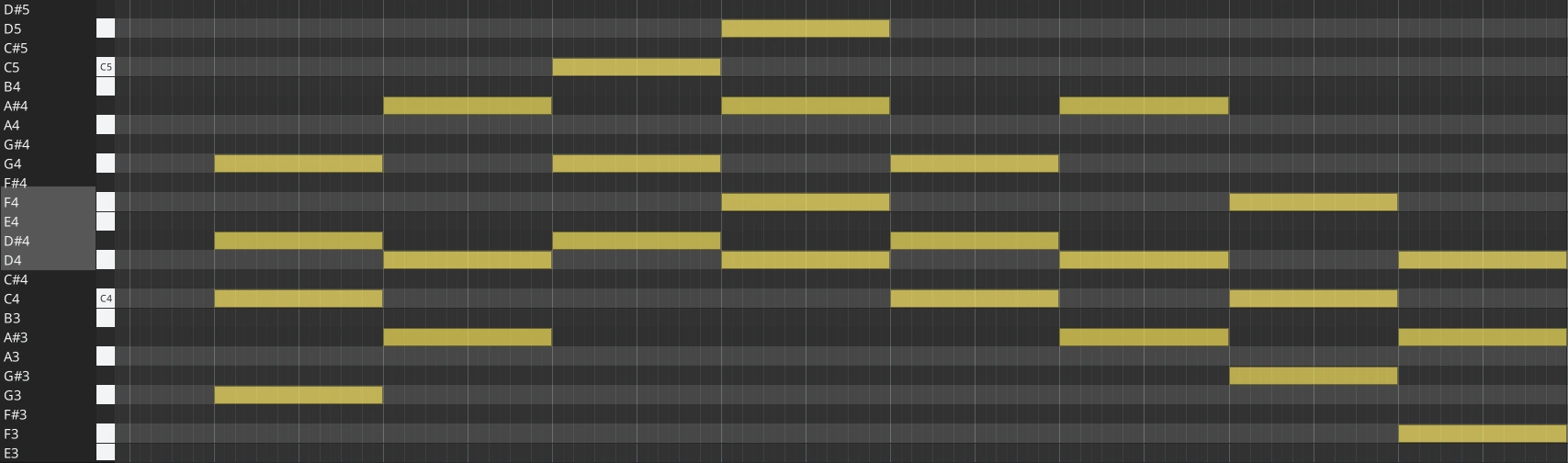
Note that Ardour has a hierarchical concept of key ownership: at the top level, a session has a key, but individual tracks (and in the future, regions and even individual processing elements, including plugins) may override that.
Another important disclaimer: while there is always a default session-level key, both visualization and MIDI input correction are strictly opt-in features on a per-track level.
The main controls are located in the right-click menu above every MIDI track’s header:
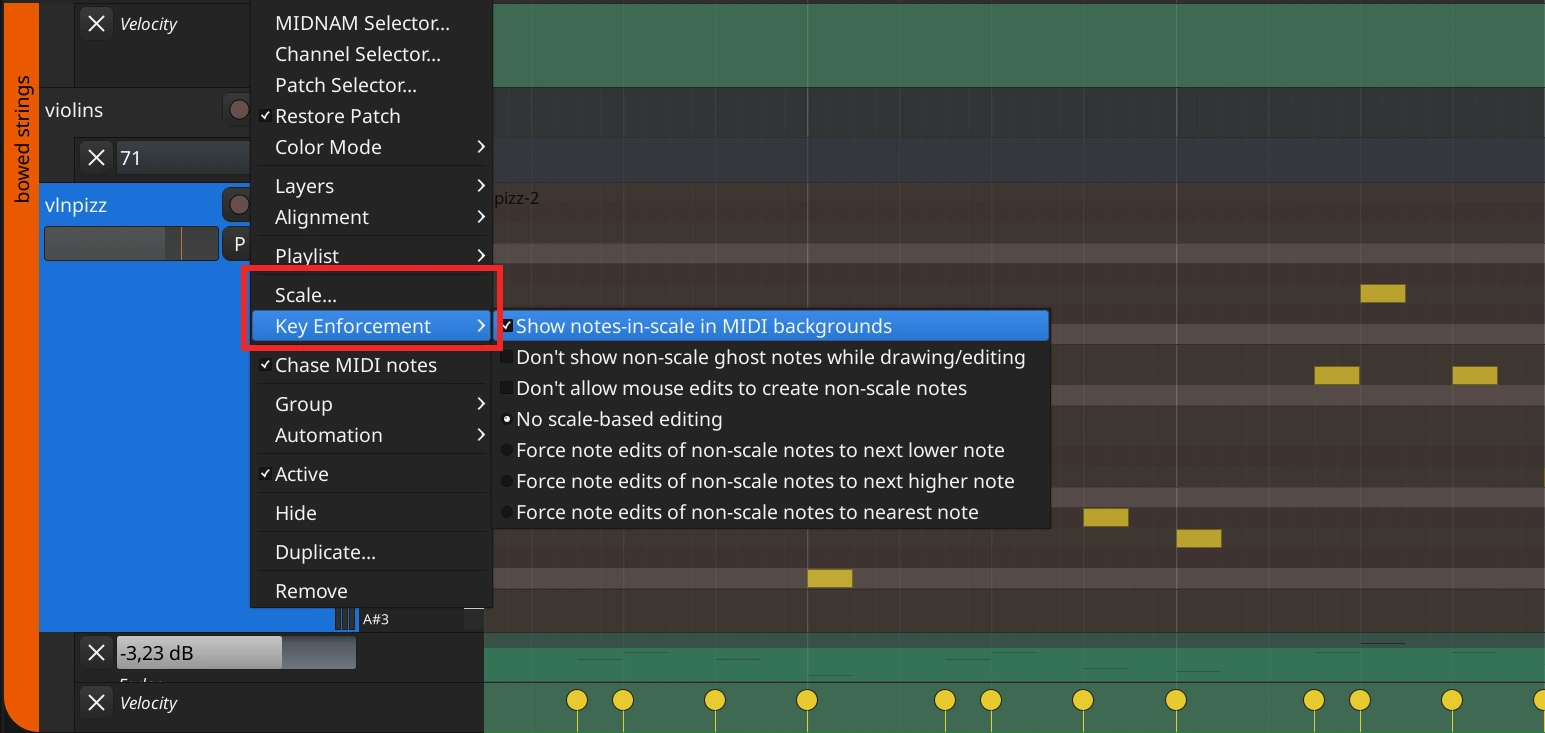
The Scale Editor has rudimentary support for selecting a per-track key and scale and visualizing how the selected scale maps to the tuning system.
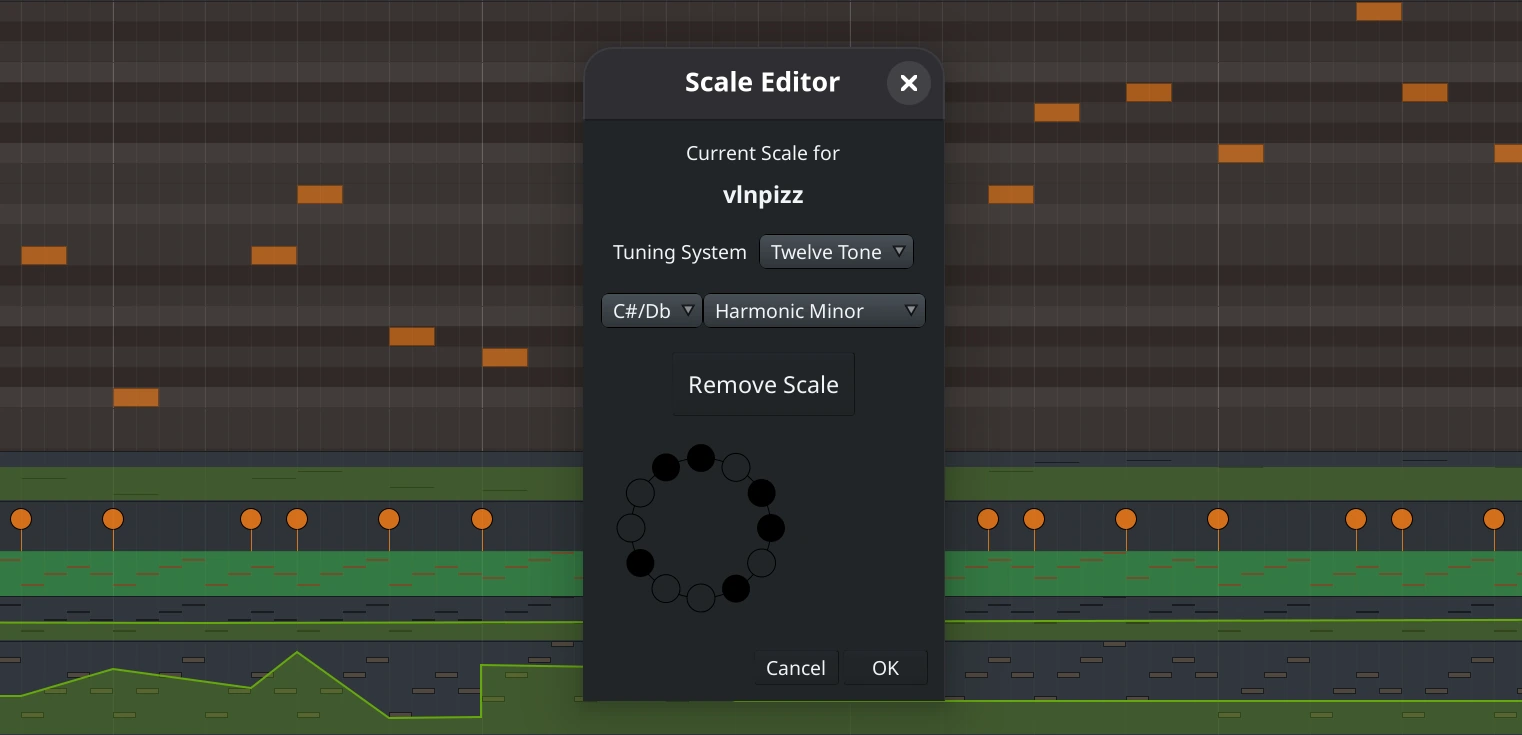
The Key Enforcement menu is where you select whether Ardour visualizes out-of-scale notes and how it enforces the selected key and scale, if at all.
You get a lot of freedom in what you can and cannot do: you can forbid drawing new out-of-scale notes if you like and instruct Ardour to automatically adjust out-of-scale notes as you play on a MIDI keyboard in three different ways.
Please note that this early implementation has various limitations. Here are some of the features we will focus on in future releases:
- Extending tuning systems support beyond 12-TET
- Supporting key and scale change on the timeline, with corresponding visualization of out-of-scale notes
- Loading SCALA files (the foundation is already done)
There is no question that complex tuning systems support in a DAW is challenging. We are releasing this code with minimal useful features to get your feedback early on. Future development of this feature set will likely span across multiple releases.
Session recovery improvements
Ardour now correctly recovers audio recordings in case the system crashes while Ardour is recording. The data loss is five seconds tops, and regions are placed at the correct positions, even when you are using loop or punch record modes.
Some file formats, notably FLAC and BWF, are not readable as-is when they are partially written to disk. In this case data of the files are recovered and written in a new file. Broadcast wave information is correctly set in the newly written files. For safety reasons the original partial file is not deleted.
Clip recording improvements
Clip recording now guarantees at least a 2-bar count-in, with the countdown displayed on the screen in the clip editor (if visible).
Ardour will record from the start of the count-down, and then adjust the clip start to the correct point. This allows you to manually slip the clip boundaries after recording, for example, in case you came in earlier. Shift-Ctrl (Cmd)-drag moves both boundaries at once, ensuring that the clip maintains its precise length.
Additionally, the audio clip editor received several fixes and improvements:
- The playhead position is now correct when data is longer than the region.
- The ruler type is now Bars|Beats|Ticks rather than minutes/seconds.
- The ruler now also has an offset to reflect the region’s start.
Arpeggiate option in MIDI Tools
The Chord Editing section of MIDI Tools now has an option to create arpeggios rather than chords:
The MIDI tools tab is now also packed into a scrolled window so that the entire editor list can be made small.
Automation drawing
Ardour now prevents bidirectional drawing from happening when you start with a straight line and change the direction.
LTC support improvements
The Transport Masters dialog now reports position when the linear timecode is not moving, and the session locates to static timecode to minimize sync time. Recording now also continues after an LTC discontinuity. This increases robustness when using LTC to record live sessions to an external clock.
Cue page improvements
- When clip recording and using hardware monitoring, reorder processors in the track so that we actually get a signal to record (and change it back when recording is complete. Don't both with this if using software monitoring.
- Do not disarm triggerbox when explicitly disarming a slot.
- Catch cleared audio regions and clean up the editor.
Plugins
- Add UI support for LV2 string parameters
- Factor out handling property change messages from LV2 plugins
- Handle LV2 parameter updates of any known type
- Support following LV2 parameters via patch:Put messages
- Disable VST micro-edit inline controls by default
- VST3: add linux lib64 search paths (added in spec v3.8.1)
- VST3: add MacOs search patch under /Network
- VST3: remove trailing slash in search path
Control surfaces and external gear support
- Add Novation Launchkey Mk4 88 support (untested)
- Fix port names used by Launchkey support (enables automated connection)
- Arturia Drumbrute MIDNAM support added
- Increase OSC thread-pool
- Add "add_section" OSC method
- OSC: fix "master" ambiguity crash #10464
- Changed data directory for us2400 device info from "mcp" to "us2400"
- Patchfiles: make manufacturer consistent across all E-mu midnams
- mackie: better logic for following selection
- mackie: use Stripable::Sorter() to sort stripables, not custom code
- mackie; fix initialization/reconnection/other
- push2: remove two deprecated scale names from scale menu
- push2: add spaces to names for melodic minor scales
- push2: catch up with libs/ardour scale changes
- push2: extend menu API to be able to use strings not just indices
Lua changes
- Lua/Mixer-Scene recall: why stop at 8?
- Add Lua callbacks to port registration and connections
Build system changes
- MinGW: Allow fftw library name to be fftw3f_threads
- MinGW: Fix errors due to Native TLS with
- MSVC: fix building libwebsockets
- MSVC: fix compiling luasession CLI
- MSVC: fix debug builds
- MSVC: getopt support
- MSVC: yet another build fix
- MSVC: correctly expose MIDIByteArray
- macOS don't warn about missing debug symbols
- macOS: fix crash when unplugging hardware device
- macOS: Include debug symbols (dSYM) with debug builds
- Added us2400 data dir to OSX & Linux builds
Other improvements
- When using a transport master, latch rec-enable control
- Clarify mixer strip import labels
- Allow translation of startup profiling messages
- Include cross-cursor preference in metadata
- (Almost) properly convert sends from old Ardour v2 session
- Enable scrolling for route comments box
- It should be impossible to seek/locate while recording; catch it
- Don't allow end BBT markers after paste
- Various small UI improvements in the region view
- Use pixel based logic to determine where to start the edge where resize/reposition occurs. This is mainly to avoid too large/too small regions for resizing.
Fixes
- Fix announcements pref name
- Fix Bad Optional Access
- Fix big-clock, this was lost when ben refactored the application bar
- Fix crash when loading old session with replicated VST3 plugin
- Fix crash when removing audio channels from RT analyzed track
- Fix crash when reset_capture() is called while recording
- Fix define name (amend 5722bfa3ec5)
- Fix handling of LV2 plugin bool parameters
- Fix importing mapped state from current session
- Fix inconsistent use of SCALA_STRICT to eliminate unused variables
- Fix master bus bottom alignment
- Fix missing return statement
- Fix MusicalKey::conform_midi_note() for case of null key enforcement policy
- Fix overlinking with MSVC
- Fix path to ytk .mo files
- Fix potential use of uninitialized pointer
- Fix potential use of uninitialized variable
- Fix region gain floating point precision near 0dB
- Fix restoring selectoin on session load
- Fix RTAV menu item separator
- Fix setting BWF Origination Ref on recovery
- Fix showing InlineControl in bottom attachment
- Fix spelling of key enforcement policy method
- Fix tautological comparisons
- Fix tempo 32bit overflow for 64bit maths
- Fix unnecessary signed/unsigned conversion
- Fix USB surface compile when libusb-dev is not installed
- Fix use of a structured binding in a lambda capture
- Fix using FFMPEGFileImportableSource for most audio files
- Fix various errors in region slip-contents drag
- Fix warning when saving new export format
- Fix windows builds, amend f421ae3b59435e
- Fixed Layer Tool tip grammar
- Fix 2 deep/difficult to understand errors in TempoMap::Paste
- Fix TempoMetric::{quarters,superclock}_at to handle special case
- Resolved Issue 0010234: Changed language of dialog box in idle_notify_engine_stopped() to better encompass the issues that may generate this dialog box
- Correctly set filename when saving loudness presets
Translation Updates
German, French, Polish, Russian
Contributors
Aleksandr Prokudin, Alexis Hildebrandt, Arendil Plummer, Bodo Winter, David Robillard, Edgar Aichinger, EZ4Stephen, Gian Fontanilla, Hoger Dehnhardt, jean-emmanuel, Jeremy Zemgulys, John Emmas, Krzysztof Gajdemski, Paul Davis, Robin Gareus, Todd Naugle, Vineet Tiwari, xris1658.
Older News
- 9.7 release.
- There was no 9.6 release.
- 9.5 release.
- There was no 9.4 release.
- There was no 9.3 release.
- 9.2 release.
- 9.0 release.
- 8.12 release, along with 8.7, 8.8 and 8.9.
- 8.6 release.
- There was no 8.5 release.
- 8.4 release.
- There was no 8.3 release.
- 8.2 released.
- 8.0/8.1 released.
- 7.5 released.
- 7.4 released.
- 7.3 released.
- 7.2 released.
- 7.1 released.
- 7.0 released.
- 6.9 released.
- 6.8 released.
- 6.7 released.
- 6.6 released.
- 6.5 released.
- 6.4 was released but immediately superceded by 6.5.
- 6.3 released.
- 6.2 released.
- There was no 6.1 release.
- 6.0 released.
- 5.12 released.
- 5.11 released.
- 5.10 released.
- 5.9 released.
- 5.8 released.
- There was no 5.7 release.
- 5.6 released.
- 5.5 released.
- 5.4 released.
- 5.3 released.
- 5.0 released.
- 4.7 released.
- 4.6 released.
- There was no 4.5 release.
- 4.4 released.
- There was no 4.3 release.
- 4.2 released.
- 4.1 released.
- 4.0 released.
- 3.5 releases.
- 3.4 released.
- 3.3 released.
- 3.2 released.
- 3.1 released.
- 3.0 released.