
Ardour 9.0 released
November 30th, 2025
We are pleased to announce the release of Ardour 9.0. This is a major release for us, seeing several substantive new features that users have asked for over a long period of time. Region FX, clip recording, a touch-sensitive GUI, pianoroll windows, clip editing and more, not to mention dozens of bug fixes, new MIDI binding maps, improved GUI performance on macOS (for most) ...
Major New Features
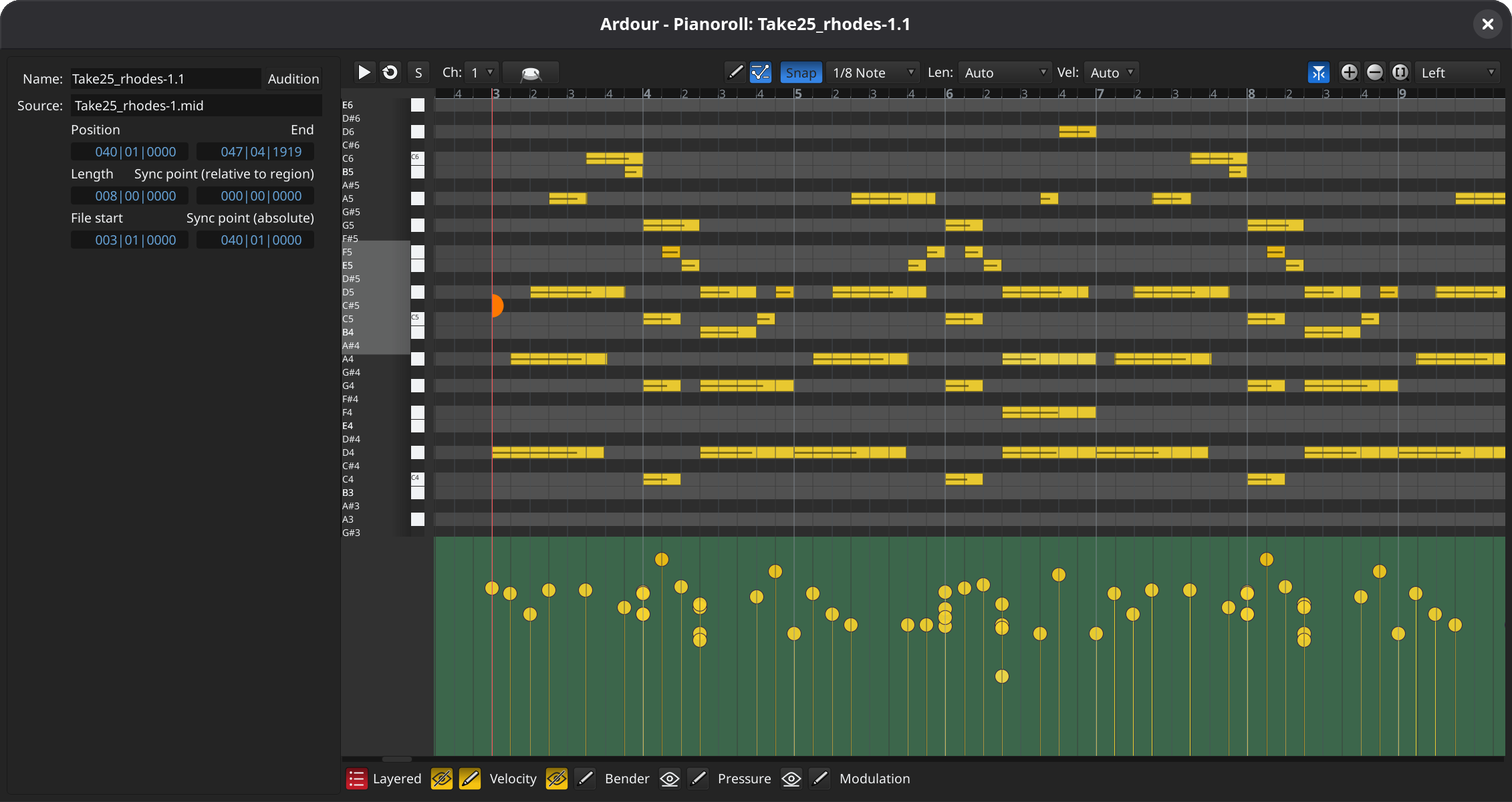
Pianoroll Windows
Double-click on a MIDI region to edit it in its own dedicated window, or in a pane at the bottom of the main window. Editing in that window will work almost identically to the way it does in the main timeline, but without the distractions of the rest of the user interface. You can also see MIDI automation (velocity, CC parameters etc.), optionally overlaid.
MIDI and Audio Cue Editing
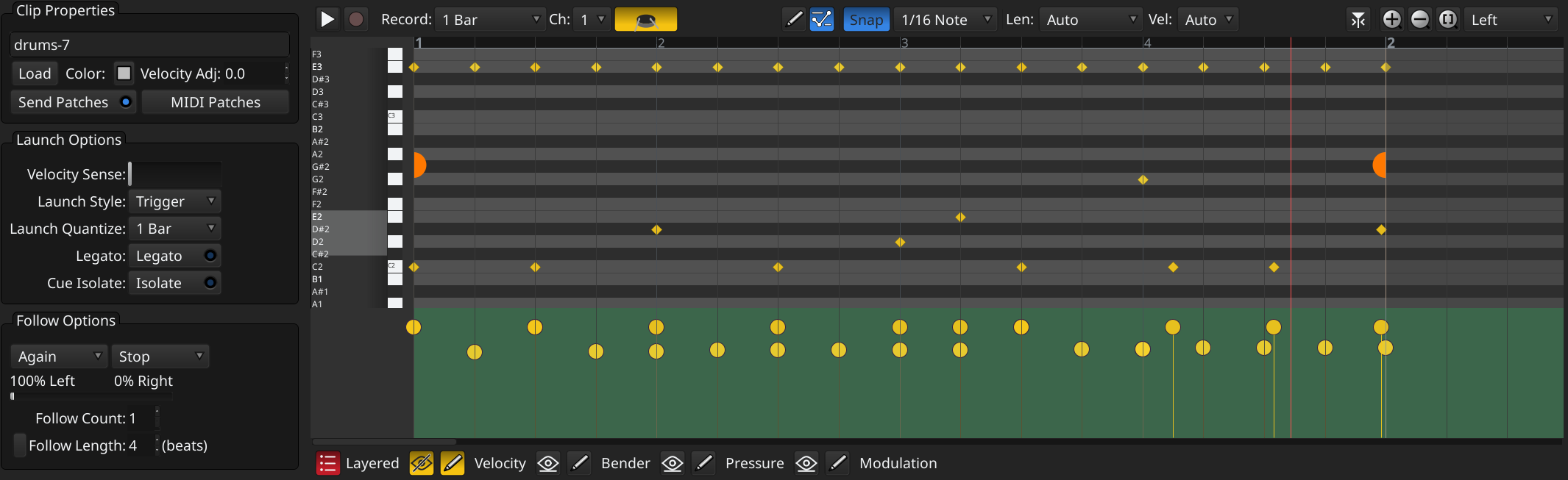
The Cue page now allows direct editing of the contents of MIDI cues (“clips” for Live & Bitwig users). A pianoroll area opens that allows precisely the same MIDI editing operations as would be available on the editor timeline.
Cue Recording
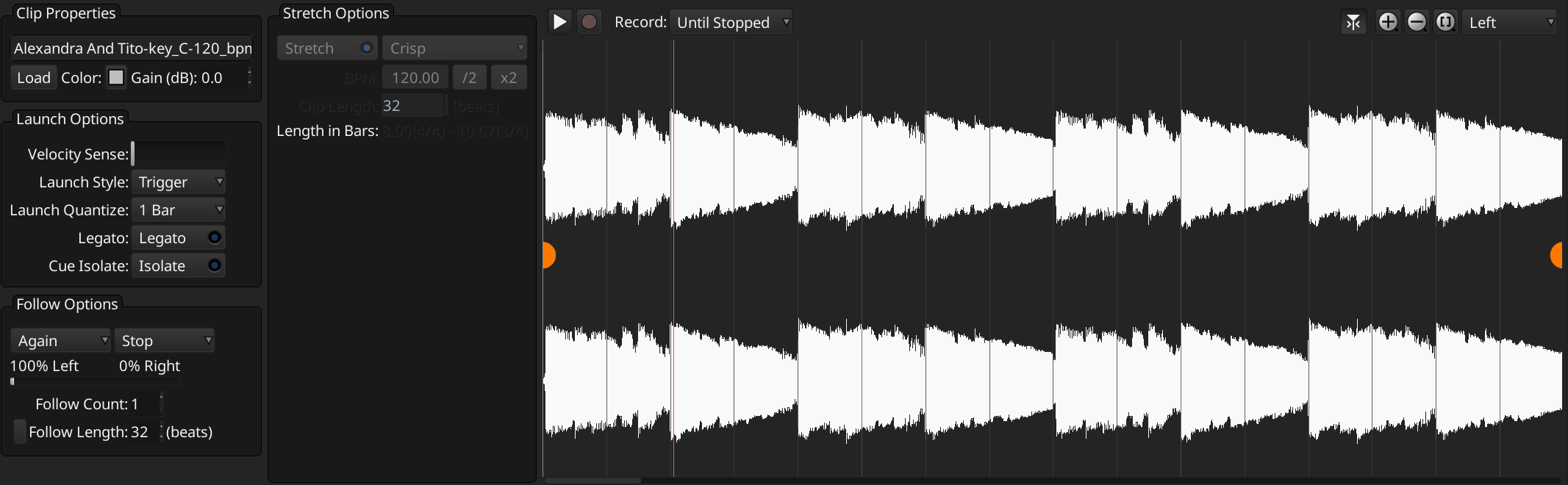
You can now record directly into cue slots, making Ardour a “looper” in the same sense that Live, Bitwig and several other contemporary DAWs are. You can pre-specificy the recording duration (e.g. “Record 4 bars”) or you can record until you think you’re done. Whatever you recorded will start playing at the next quantization point (e.g. bar/beat).
Region FX
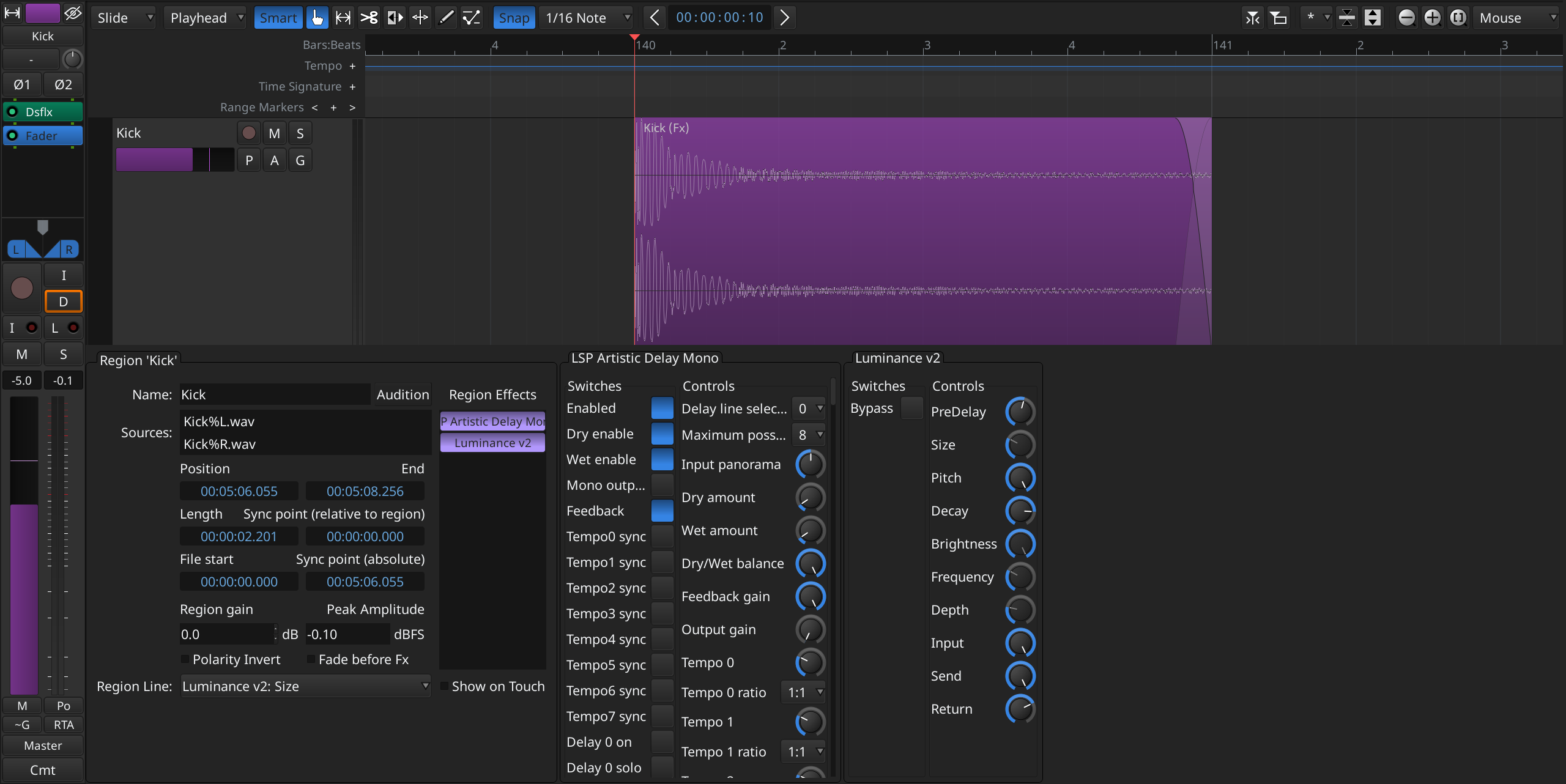
If you've ever asked “how do I add some delay to just this part of my vocal?”, then region FX are what you've been looking for. Similar to region gain it allows to apply any plugin a given audio region only. The effect and its automation remains with the region, even when it is moved around on the timeline. While the same result can be achieved with channels-strip plugins in the mixer (using bypass automation) applying effects directly to regions on the timeline is convenient for many workflows. The given effect is applied offline, when reading the region from disk and does not add any additional DSP load.
Realtime Perceptual Analyzer
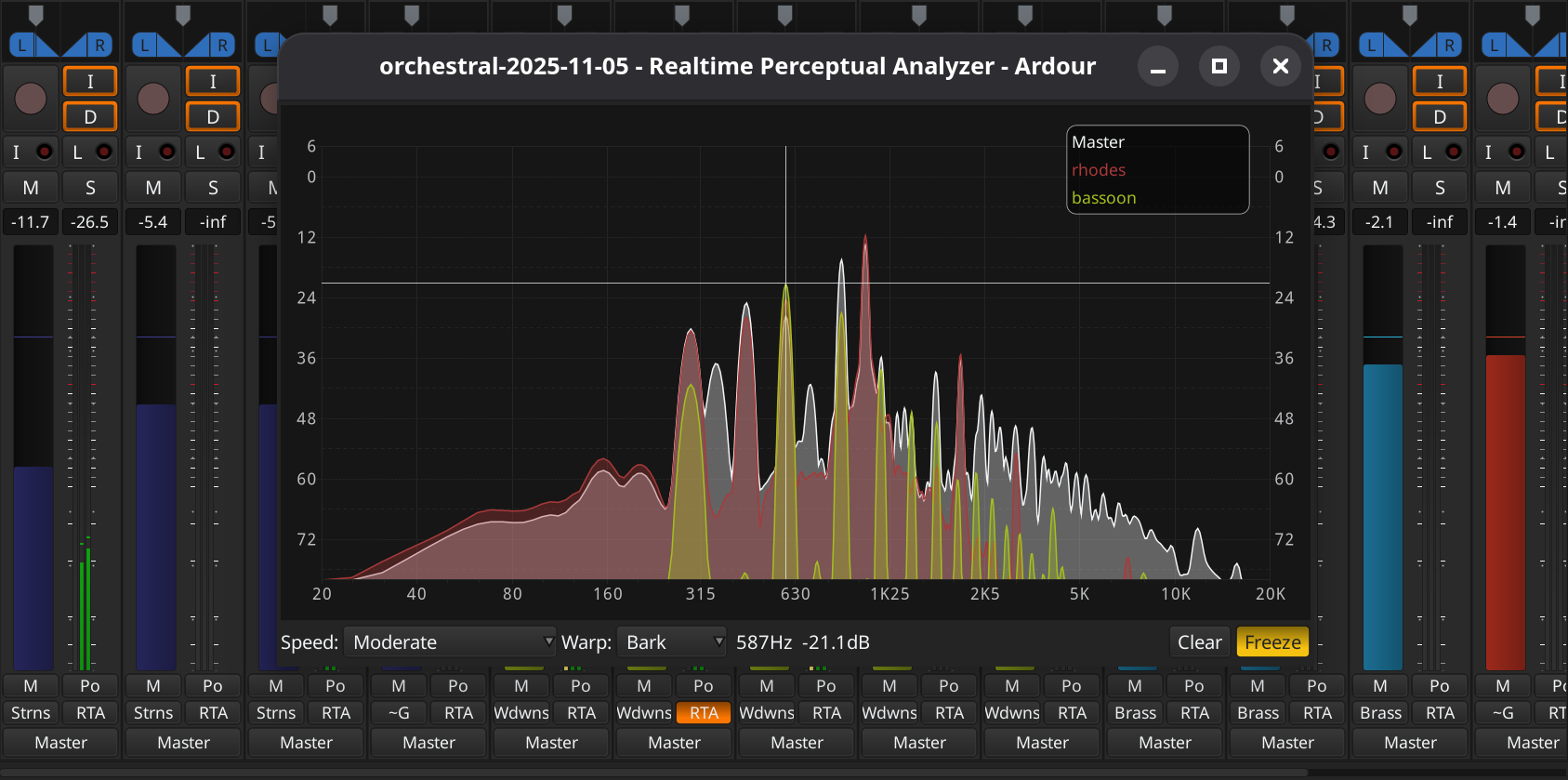
A dedicated perceptual analyzer window is now available within Ardour which allows one to visualize the live spectrum of multiple signals. A key feature is that one can overlay individual sources (tracks and busses) on top of each other. This allows one to see which track contributes a given of frequency range to the overall mix, find conflicting ranges or holes in the spectrum.
Note Brushing
Want to set up a pattern of hihats every 1/16th notes? 1/8th note pizzicato strings every 1/4 note? Just hold down the shift key and drag the mouse while draw MIDI notes, and Ardour will fill according to your grid and note settings. Hold down2 Alt as well, and get only every other note drawn. Engage caps lock, and you can pick the notes that are drawn from a MIDI keyboard or pad device. A fast, easy way to draw melodies and rhythms.
Keyboard-Driven Automation Editing
You can now use keyboard modifiers, arrow keys, and the Enter key to add new automation control points and change their position and value.
Mixer Strips Importing and Exporting
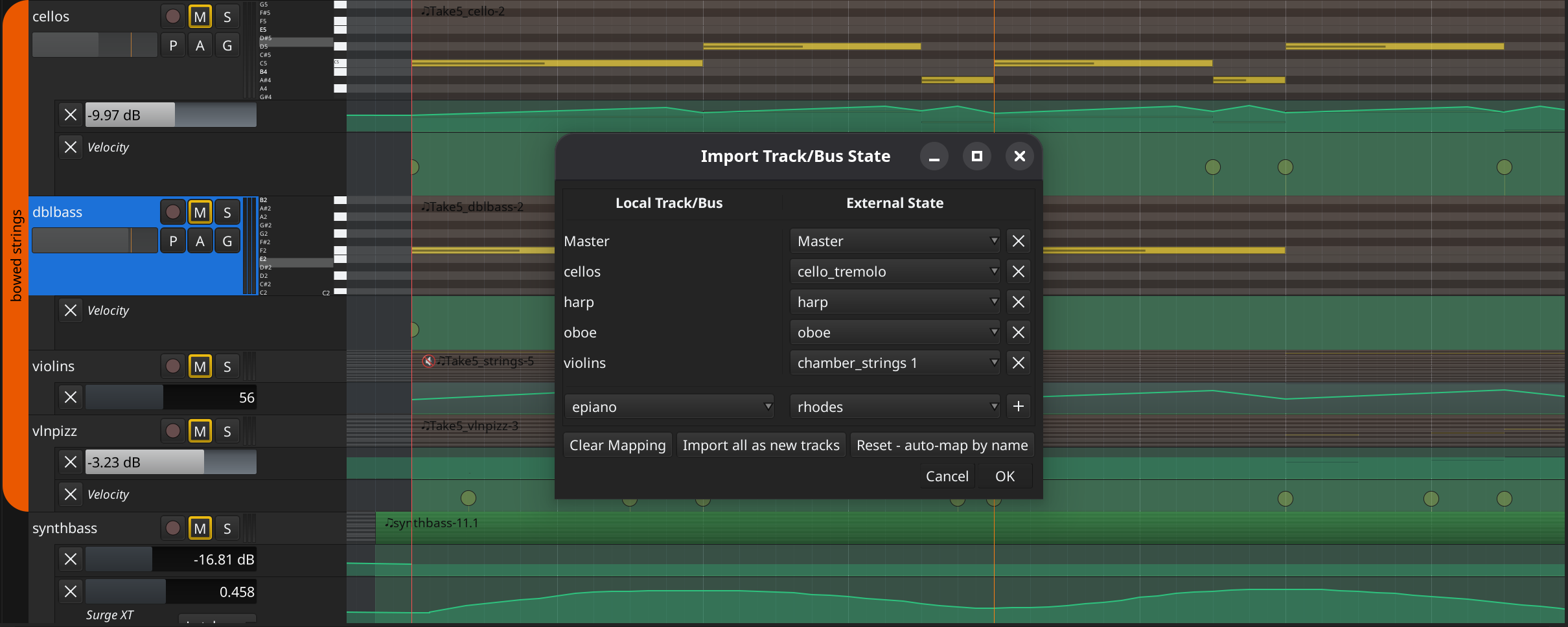
You can now import mixer strips from arbitrary Ardour sessions as new track or map existing track to processing in mixer strips of external sessions. You can also export strips as local (session-level) or global presets for reuse.
Multi-Touch GUI
On Linux and Windows, Ardour now supports multi-touch interaction as provided by the operating system. This may come for macOS eventually, but the way multi-touch works there is significantly different and will need more work.
User Interface Changes
Updated Application Bar and Pane Control
The application bar was cleaned up and reorganized for each context. Editor specific options toggles, such as Follow Playhead and Follow Range, are now in the editor toolbar next to zoom controls. Other advanced and workflow specific options such as Rec Cues and Play Cues and the Plugin Delay Compensation (PDC) section are not shown by default anymore. Sections visibility can be configured in Preferences > Appearance > Application Bar.
Additionally, one can now toggle the visibility of the left, the right, and the bottom panes directly from the toolbar. The control section is on the right, next to page switchers.

Revamped Editor List
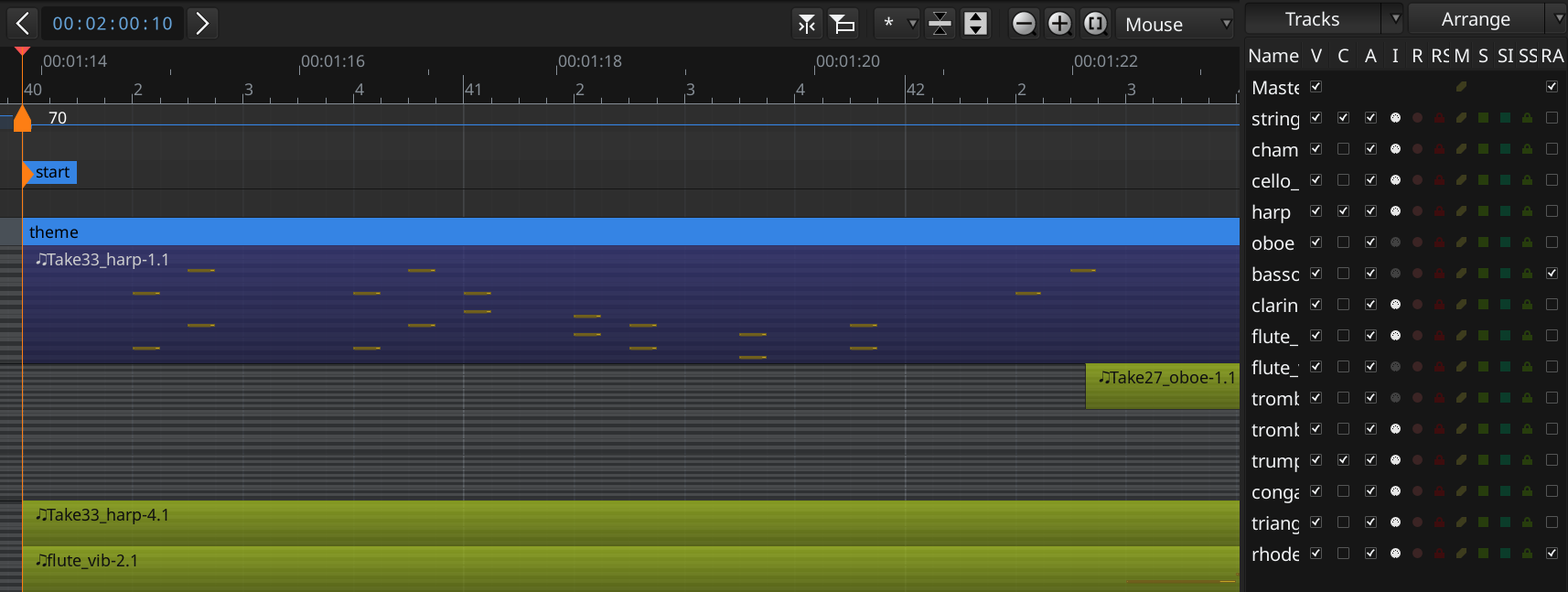
The editor List panel has been redesigned to simplyfy switching between two commonly used tabs which you can select at the top of the panel.
Revamped New Session Dialog
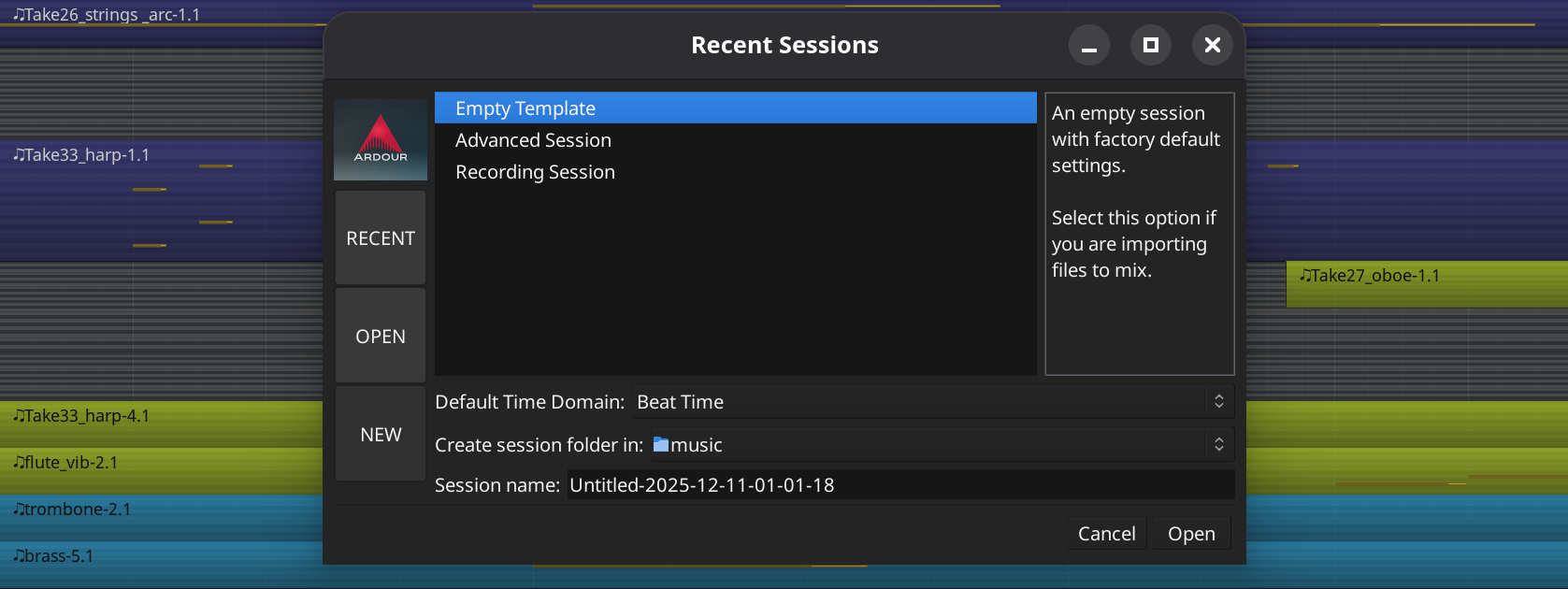
We now used tabbed interface for the New Session / Recent Sessions dialog where you can quickly switch between creating a new session, opening a recent one, and opening an arbitrary session from the disk. The new dialog was originally developed for Harrison LiveTrax.
Updated Ruler Area
Rulers now have additional controls to add new markers and navigate to the previous or next marker from the current playhead position. Several rulers have been collapsed into one: all range-based markers are in one ruler, and all location-based markers are in another.

Improved Library Manager
The dialog for managing clip libraries has received cleanup:
- Only show progress bar when downloading/installing.
- Don't allow re-install.
- Scale progress bar width with UI.
- Make sure target clip library folder exists.
MIDNAM Controls Relocated
MIDNAM related controls have been moved out of the track header of MIDI tracks and into the header context menu. Far too many users were confused about the functionality associated with these controls, so we've moved them to a place where we can make this much clearer.
Editing Changes
- Ardour now supports the concept of MIDI files and regions that are longer than their data would suggest (e.g. a 4-bar segment with the last note before the end of the 4th bar). This is mostly useful when playing clips in the cue editor for looping to work corectly.
- Step Editor improvements:
- Chord mode: step on note-off.
- Improve overlapping note handling:
- No need to shift notes during normal edit.
- Prevent duplicate (overlapping) chord notes.
- Better management of visible note range in MIDI tracks and pianorolls.
- Add MIDI note strumming operator.
- When timestretching an audio region, stretch both its gain envelope and region-FX automation.
- In the internal edit mode, a rubber-band select with no motion (i.e. click) selects region.
- In pianoroll editors, allow shifting all existing MIDI later in a region/clip during a drag operation (this is not yet possible for editing on the main timeline (in the editor).
- Region trimming now obeys ripple mode settings.
- Drag threshold returns to using just pure pixel distances (rather than distances that are affected by the current zoom level).
- Copy-drags now require more motion before they start.
- Switch to draw tool when selecting region line to be shown in the region editor.
- Dragging notes past the end of a MIDI region extends it to cover them.
- The new "Any" algorithm for timestretching uses the StaffPad library.
Other Improvements
- Default file format is now WAV-compat RF64.
If the file is too large for WAV, it will be converted to RF64 automatically; otherwise it will be a normal WAV file. Ardour has supported this format for years, but it is now the default one to use when recording.
- I/O plugins and their ports can be renamed now.
- ACE fluidsynth: unload soundfonts after use, allow MMA style bank select an all channels, and pick drums on channel 10 when available.
- Round to bars when mouse scroll/dragging BBT bars.
- Monitor controls in application bars now appropriately sensitive.
- Show "+" icon on editor track-header area.
- Use round-robin palette color for new groups.
- Add "search all" mode to the mixer's sidebar plugin list.
- Prevent issues when changing processors while recording #10017.
- Make scrollbar less prominent with default theme and themeable.
- Update themes, make transport option button state visible.
- Enforce a 1 octave minimum note range in MidiViews.
- Set executable stack flag when linking.
This is required on some modern hardneded Linux systems to allow to dlopen executable objects (load plugins).
- Ignore FLAC seek/peak-file read while recording.
- For the dark colored theme (the default) make pianoroll dividing lines less bright.
- Single pixel line, in themed "black" color, to divide B/C and E/F on piano roll header.
- Add find-and-display-stripable, bound to
Ctrl/Cmd-Shift-l by default. - MIDI mute fix
Previously, a sustained note that was audible as a track was muted would not return when the track was unmuted. Now, the note willreturn after the track is muted/unmuted during its duration.
- Exclusive solo may select track.
- Micro-optimization: speed up connection-matrix rendering.
- Clarify PDC label (units, label).
- Add color scheme for inactive selected tracks.
- Allow selection of inactive tracks.
- Replace git.ardour link with github
git.ardour.org no longer allows access to individual commits or source files (thanks to LLM scrapers trying to get them one by one, which is ridiculous).
- Sources/Regions get their own tempo and meter.
- Don't show hidden tracks in the editor-mixer.
- Reduce likelihood of dropouts when reordering processors (plugins etc).
- Use configuration parameter for max gain, not 6.0/2.0.
- More correctly handle real-time (MMCSS) threads on windows.
- Add popup dialog when MMCSS threads are exhausted.
- Overhaul persistent tooltip position #9979.
- Reimplement MIDI file import to retain metadata in the
files written.
Previosuly, all meta data was thrown away. Now we retain it, so that MIDI regions can ask about their source file's tempo & meter.
- Allow selection of VCAs in the mixer window.
- Produce valid HTML when printing bindings.
- Add click-free bypass/enable to the ACE Amp plugin.
- Implement restoring hardware-to-hardware connections for internal backends
- Improve keyboard shortcuts for track height
Just use Alt as a modifier, instead of Alt-Shift.
- Expose marker scene change editing
Allows for editing scene change information for location and arrangement markers. This "edit mark" menu was previously inaccessible. Now accessible via double clicking a marker.
- Fix 'Arrangement Boundary' toggle for scenes
The 'Arrangement Boundary' toggle was not working correctly for markers with scene changes. Location markers would get turned into section markers, but would not get shifted down to the correct row.
- First time use dialog now allows the user to specify a default location for samples/clips.
- You can now create audio inputs for VST3 plugin in the Pin Connection dialog directly rathar then create instances. This already worked for AU and Lua plugins prior to v9.0.
- Add support for global mixer strip templates to the Template Manager.
- Support newer APIs at Soundcloud and Freesound.
- Improve behavior when editing BBT markers.
- Allow SchedRR for I/O threads, as originally intended.
Plugin Support
- LV2: add Bool variant support.
- LV2: don't hide bypass/enabled port
- LV2: remove non-standard, deprecated bypass/enable extension.
- LV2: fix loading channel numbers from standard/common port groups.
- VST3: initialize bus and speaker arrangement during instaniation.
- VST3: implement host/global IContextInfoProvider (for Sonible VST3 plugins).
- VST3: Allow IRunLoop to query itself.
- Fix VST3 spec link.
Lua Scripting
- New features:
- Expose control point and automation line selection as Lua bindings.
- Add support to create midi regions from Lua.
- Add support to set color transparency from Lua (with example script).
- Add Lua script snippet showing how to add sources to a track.
- Add fade_in_length and fade_out_length Lua bindings on region.
- Add new text control type for LuaDialog, based on Gtk::TextView.
- Expose some session statistics (number of routes, tracks, audio tracks, busses) as Lua bindings.
- Add missing Lua bindings for Route Import.
- Add missing Lua Bindings for UIConfig.
- New scripts:
- Add a Lua script to capture impulse resoponses.
- Add a Lua script to create a playlist on selected audio tracks with only audible contents.
- Fixes and improvements:
- Fix region-gain curve example script.
- Properly create LuaWindow (always use Ardour's window manager).
- Update track organizer Lua script to use text-area for comments.
External Gear and Software Support
New MIDI binding maps
- Behringer CMD LC-1
- Novation Circuit
- Nektar Impact GXP
- Nektar Impact LX
- Arturia Keylab 49/61/88 mk2 (MCU and Arturia Lab mode)
- LAudio (Worlde) EasyControl.9
New MIDNAM Files
- Boss GT-8 and SE-70
- Whammy DT
- XLN Audio - Addictive Drums
- XLN Audio - Addictive Drums (Brushes)
- XLN Audio - Addictive Drums 2
- XLN Audio - Addictive Drums 2 (Brushes)
Mackie Control Protocol
- Support for the Icon Pro Audio V1-M, P1-M, and P-NANO controllers, with RGB color display support.
- Latch automation is now supported.
- An attempt to select a track specific subview without having a track selected now spits out a message instead of just doing nothing.
- Foldbacks busses are now available again, with correct sorting.
- Clear potentiometer LEDs when the potentiometer is empty.
- Correctly disassociate potentiometers when switching modes.
- Fix banking in plugin subview.
- Show warning message for empty views.
Other
- Properly match Launchkey interface/device names.
Importing and Exporting
AAF Importing
- Updated to version 1.0-22.
- Improved log messages.
- Bugfixes for clip length beyond end of file, sessions with missing clips, and region gain issues.
Other
- Fix loading v2 and v3 sessions.
- Fix loading multichannel tracks and regions in the ProTools importer.
- Successfully import SMF files with badly-formed time signature events.
macOS Improvements
- Faster GUI drawing
Without telling anyone, Apple have subtly changed the way their drawing APIs work for graphical applications over the last 5-10 years. The result has been that a naive graphical app would end up redrawing its entire window even if only a few pixels needed updating. We’re far from the only application to be affected by this. In Ardour 9.0 the GUI drawing speed will be significantly faster, at least on very dense pages like the mixer.
This is a complicated area, and there are still monitor configurations where our new implementation will misbehave. You can switch back to a drawing model where macOS is in charge, which will work but can be slower.
- Reduce chance of "device busy" when ejecting DMG.
- Improve retina scaling.
- Add new NSApplicationDelegate method to deal with warning on macOS Sonoma.
- Use ArdourMono font on macOS for consistency.
- use small text for ruler text on macOS.
New Preference Settings
- Stop transport using the current grid (Transport)
- If enabled, stopping the transport (playback or recording) will happen at the next grid point instead of immediately.
- Region Editing Preference (Editor)
- This controls whether double-clicking to edit a region opens a new window or uses the bottom panel of the editor.
- Default location of new windows (Appearance)
- This setting defines where new non-modal Ardour windows are opened by default: at the center of the screen, centered at the mouse pointer position, or centered at the parent window.
- Drag deadzone (Appearance > Size and Scale)
- This setting provides broad control over how many pixels the pointer must move before a drag (or copy-drag) begins.
- Group operations on selected tracks (General)
-
In Ardour 8.x, we introduced the idea that selected tracks/busses form a "quick" or "implicit group", so that if you select 3 tracks and adjust the volume of one of them, the others will follow.
Some users were delighted with this, others were not. This preference item can turn this behavior on or off.
- VST3 Knob Mode (Plugins > GUI)
- Enforce a knob mode for VST3 plugins: use plugin default or switch between linear (depends on vertical movement) and two variation of circular, with and without a jump to clicked position.
- Automatically open instrument plugin GUI when adding a new MIDI Track/Bus (Plugins > GUI)
- Ardour now defaults to automatically showing instrument plugin GUIs when new tracks/busses with instruments are added. If multiple tracks are added, Ardour will only show the GUI for the first one. This setting allows you to opt out of the new behavior.
Fixes
- Fix some odd behavior when using note splitting/joining.
This commit ends the split/join operation any time selection is cleared or notes are added to the selection (except when in the middle of a split). This prevents some rather hard to predict behavior when using note splitting.
- Redraw arrangement rectangles after tempo change
Previously they remained unchanged and thus incorrectly indicating an arrangement section
- Fix MIDI Clock generator (rounding issues).
- fix crash after deleting a track/bus.
- Fix crash when loading session from a running instance.
- Fix export encoder race condition.
- Fix crash when dragging plugins from sidebar.
- Fix PT Import when track name contains illegal chars.
- NetBSD build fixes.
- Fix incorrect placement of message catalogs during installation.
- Some potential fixes for weird note split/join behavior.
- Fix crashes when moving mouse over port-matrix.
- Fix race-condition when detecting xjadeo/harvid version.
- Fix false read-only detection of sessions on Windows with OneDrive.
- Fix many issues with precise pixel alignment of MIDI note lines and the keyboard in track headers.
- Fix comment-editor editing to allow inserting text.
- Fix opening links in preferences editor (e.g. VST spec).
- Fix #9961, update saved port-name references when renaming ports.
- Fix MIDI panic timestamp at cycle-end.
- Fix timecode update after locate for demo version.
- Fix a simple but rather error when computing the number
of quarter notes that correspond to a number of beats in a
given meter.
No effect when working in common (4) time, but significant effects for other time signatures/meters.
- Fix computing the difference between two Bar|Beat|Tick (BBT) times.
- Fix edge case when region start is after the source' end
This fixes an edge case where an audio-region was split near its end using music-time.
- Fix jump in gain when deactivating aux-send with non-unity gain.
- Fix generic UI plugin support for numeric properties.
- Fix crash due to concurrent sndfile access.
- Don’t install test programs.
- Fix various crashes with OSC support.
- De-click external sends.
Abandoned
- Drop Frontier Tranzport control surface support.
The device has not been manufactured for 15 years, and the control surface code never worked very well anyway.
Translation Updates
Czech, French, German, Polish, Russian, Simplified Chinese, Spanish.
Coding & Build Changes
- We began to use C++17 syntax and features, which causes to drop support for macoS earlier than 10.13 (High Sierra, 2017).
- We moved a lot of our C++ header file inclusion to use
#pragma once - PBD::Signal was reimplemented using contemporary C++ and avoiding as much realtime memory allocation as possible.
- Large amounts of our use of the Boost libraries were
replaced by their
std::equivalents. - The build-time requirements for JACK were bumped to JACK2.
- THe build system will now allow builds with recent msys2/mingw.
- reduce use of gettimeofday in favor of truly monotonic time.
- Use global FFT planner lock in GUI
This should not be needed since the GUI is single threaded, but it doesn't hurt, just in case some someday someone uses a background thread :)
Documentation
The user manual has been updated to match all changes in v9.0.
The tutorial is now available in French and Italian thanks to Julien Taverna and Christian Galeffi.
Contributors
31core, agfline, Alejandro Domínguez, Alexandre Prokoudine, Antti-Pekka Meronen, Ayan Shafqat, Ben Loftis, Bill Smith, chmaha, chousemp3, Colin Fletcher, Daniel Appelt, David Robillard, Edgar Aichinger, edwar4rd, EZ4Stephen, Franke Burgarino, Gian Fontanilla, Hoger Dehnhardt, Houston4444, Jakob Dübel, jean-emmanuel, John Emmas, Jon Bennett, Juan Vardy, Julien Taverna, Krzysztof Gajdemski, laIK4ndPDScproJyv9ofA, luzpaz, Mads Kiilerich, Martin Vlk, Matthew Smith, Nicolas Koch, Nil Geisweiller, Nils Philippsen, npt-1707, oxfn, Paul Davis, Robin Gareus, Roger Wilco, Steffen Klein, Todd Naugle, tonilink, Yuriy Al. Shirokov, Zabooma